Data portability is fundamental in digital marketing. UseClick ensures you have complete access to your data and can export it without lock-in.
The export system gives you granular control over what data you export, making it easy to integrate with existing reporting and analysis processes.
This guide covers data exports from CSV downloads to BI-tool workflows and recurring reports.
Data Export Interface
Access your data through UseClick's export dashboard:
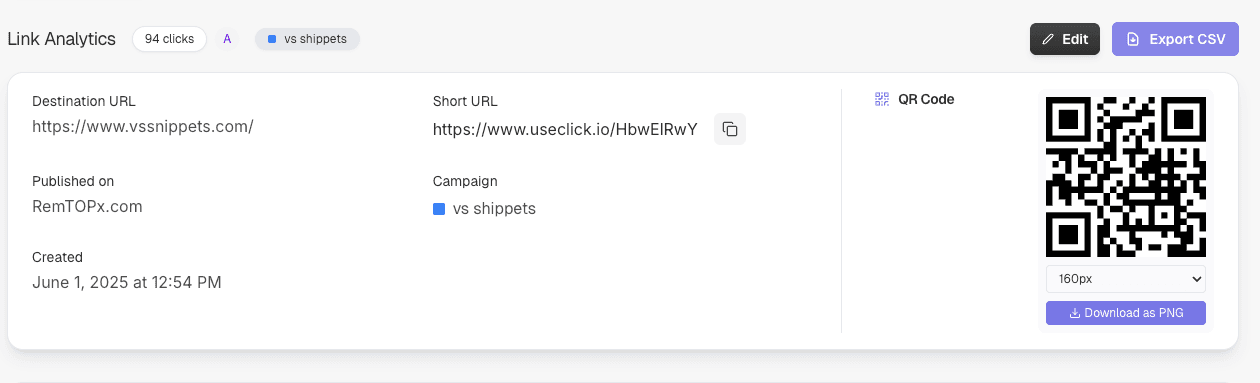
Configure exports by date range, campaign, or specific metrics with preview functionality.
Export Data Categories
Export the data types you need for analysis, reporting, and archiving.
Available Data Categories
Link Analytics Data
Complete click data for performance analysis and attribution.
- • Timestamps and click events
- • Country, device, and browser data
- • Referrer and source information
- • Unique and total click metrics
Link Management Data
Export your link inventory for audits, migrations, and internal documentation.
- • Short URLs and destination addresses
- • Creation dates and status
- • Campaign and folder assignments
- • Custom slugs and branded domains
Campaign Performance
Aggregated campaign data for comparisons and management reports.
- • Click totals by campaign
- • Performance comparisons across channels
- • UTM parameters and attribution
- • Time-based trends and top performers
Supported Export Formats
Choose the format that best fits your workflow and analysis requirements:
CSV (Comma-Separated Values)
Universal format compatible with spreadsheet applications:
- • Excel and Google Sheets compatible
- • Easy data manipulation and analysis
- • Lightweight and fast processing
- • Perfect for manual analysis
Business Intelligence Integration
Use exported UseClick data in your existing analysis and reporting tools.
Compatible Analysis Workflows
Google Analytics and Web Data
Combine link data with website analytics for end-to-end attribution.
- • UTM campaign matching
- • Compare clicks and website sessions
- • Analyze landing page performance
- • Build cross-channel reports
Tableau and BI Dashboards
Import CSV data into BI dashboards for recurring reports.
- • Create dashboard visualizations
- • Compare campaigns by date range
- • Analyze regional performance
- • Standardize management reports
Google Sheets and Excel
Work quickly with raw data in spreadsheets and templates.
- • Create pivot tables
- • Fill weekly report templates
- • Combine metrics with team data
- • Build charts and shared reports
Privacy and Compliance
UseClick's export system is built with privacy-first principles and compliance requirements in mind:
GDPR Compliance
Data Minimization
Export only the data you need with granular filtering options.
Select specific date ranges, campaigns, or metrics to minimize data exposure.
Right to Data Portability
Complete data export rights as required by GDPR Article 20.
Export your data in machine-readable formats for transfer to other services.
Secure Data Handling
Encrypted data transmission and secure download links.
Temporary download links with automatic expiration improve security.
Data Analysis Use Cases
See how teams use UseClick exports for stronger business insights:
Marketing Performance Analysis
Comprehensive campaign attribution and ROI analysis:
Executive Reporting
High-level insights for strategic decision making:
Customer Journey Analysis
Understand user behavior and engagement patterns:
Data Export Best Practices
Regular Data Backups
Maintain reliable data archives for business continuity:
- • Schedule weekly exports for ongoing campaigns
- • Create monthly archives for long-term storage
- • Export complete datasets before major changes
- • Maintain multiple backup locations for redundancy
Data Quality Verification
Ensure export accuracy and completeness:
- • Verify date ranges match your requirements
- • Check for missing campaigns or time gaps
- • Validate metric calculations against dashboard
- • Test imports in target analysis tools
For organizing your data before export, use campaign management to group related links and make exports more structured.
Efficient Analysis Workflows
Optimize your data analysis processes:
- • Create standardized analysis templates
- • Automate common calculations and visualizations
- • Establish consistent naming conventions
- • Document analysis methodologies for team consistency
- • For managing large numbers of links, consider using our bulk upload feature to efficiently organize your link portfolio.
Enhance your exported data with UTM parameters for more detailed campaign attribution in your analysis.
Reporting Export Close-Ups
Export-ready analytics views for teams that report weekly, monthly, and quarterly performance.
CSV for Full Link Analytics
Download click events, devices, locations, and campaign data in spreadsheet-ready format.
Custom Date Ranges and Timezones
Match exports to internal reporting windows with custom days and timezone-aware analysis.
Trend Exports by Hour, Day, and Month
Support performance reporting by best hour, best weekday, and top-performing months.
Historical Analysis
Use historical exports for long-term campaign reviews and seasonal comparisons.